At Scale, Users Speak in Events: How EnfoldAI Turns Them into Answers and Decisions
Event-driven product analytics at EnfoldAI: one allowlisted Android logger, BigQuery facts rebuilt from the Firebase export, and a guarded text-to-SQL agent.
 Mayank TalwarCo-founder and CTO
 Dhruv KalraFounding Engineer
 Boya Veera PavanFounding Engineer
15 October 202613 min read
EnfoldAI · Setup · First launch
To use EnfoldAI protection, make it your default SMS app.
Set as default- Logged
- This screen, and the button tapped
- Never logged
- Messages, numbers, contacts
In 2025, Indians reported 28.15 lakh cyber-fraud cases and lost ₹22,495 crore, according to Ministry of Home Affairs figures reported by ThePrint. A scam-protection app helps with that only on the phones where someone finished setting it up, and for EnfoldAI setup includes asking Android to make us the default SMS app.
At our own community sessions we can watch people install the app and see where they hesitate. Everywhere else, the only way to learn how people get through setup, which screens they come back to and where they give up is to have the app tell us, one event at a time.
This post follows those events from a tap on the phone to a decision about the product. Three ideas shaped the design. An event is a contract between the app and everyone who reads the data, so it needs a catalogue and a test. The warehouse rebuilds facts from the raw log rather than patching them, so any number can be recomputed and argued about. And a number earns a decision only when everyone means the same thing by it, which is harder than collecting it.
Background: event-driven analytics on Firebase and BigQuery
An event-driven architecture treats things that happened as immutable records. Producers emit them without knowing who will read them, and consumers build their own views from the stream. Product analytics fits that shape well, because the app shouldn't care whether a tap ends up in a funnel, a retention cohort or a campaign report.
Two platform facts shape our version of it. Since Android 10, an app becomes the default SMS app by requesting the SMS role through RoleManager, which shows the person a system prompt they can decline. So our onboarding crosses a screen we don't control, and our events have to describe what happened around it.
The second is how events reach the warehouse. We collect them with Google Analytics for Firebase and export them to BigQuery. Google's BigQuery Export documentation describes a daily export of the previous day's unsampled events, and a streaming export that is best-effort, may contain gaps and is deleted once the daily table is complete. Much of what follows is about living with that difference.
We treat every input to a number as untrusted until it's checked.
| Input | What can go wrong | How we treat it |
|---|---|---|
| An event from the phone | Battery management on some phones stops it from ever uploading | Evidence of what someone tried; outcomes the server can confirm are counted from the server |
| Event names and fields | Any engineer who ships a screen can add or rename one | A catalogue with an allowlist and a contract test |
| The streaming export | Best-effort, with gaps | Provisional until the daily export replaces it |
| Test phones and our community sessions | They look like real installs | Dropped, or attributed to us, before anything is counted |
| A metric's definition | Each query author can write their own | One definition, shared by every view |
Invariants
These had to hold whichever screen, export or query was misbehaving, and later sections refer back to them.
| ID | Invariant | Enforced by |
|---|---|---|
| I1 | An event whose name isn't in the catalogue never leaves the phone | One logger with an allowlist |
| I2 | A catalogued event name keeps its meaning | A contract test that fails on a rename or deletion |
| I3 | Every event says whether a person or the app caused it | An actor field on every event |
| I4 | Message text, phone numbers and contacts never appear in an event | Written rules on event groups, and an allowlist on the fraud-report flow |
| I5 | Recomputing a day never counts it twice | Delete and insert inside one transaction |
| I6 | A number that can't be trusted yet says so | A freshness gate, and provisional days marked until the daily export lands |
| I7 | Outcomes the server can confirm are counted from the server | Sign-ups counted from accounts |
Architecture overview
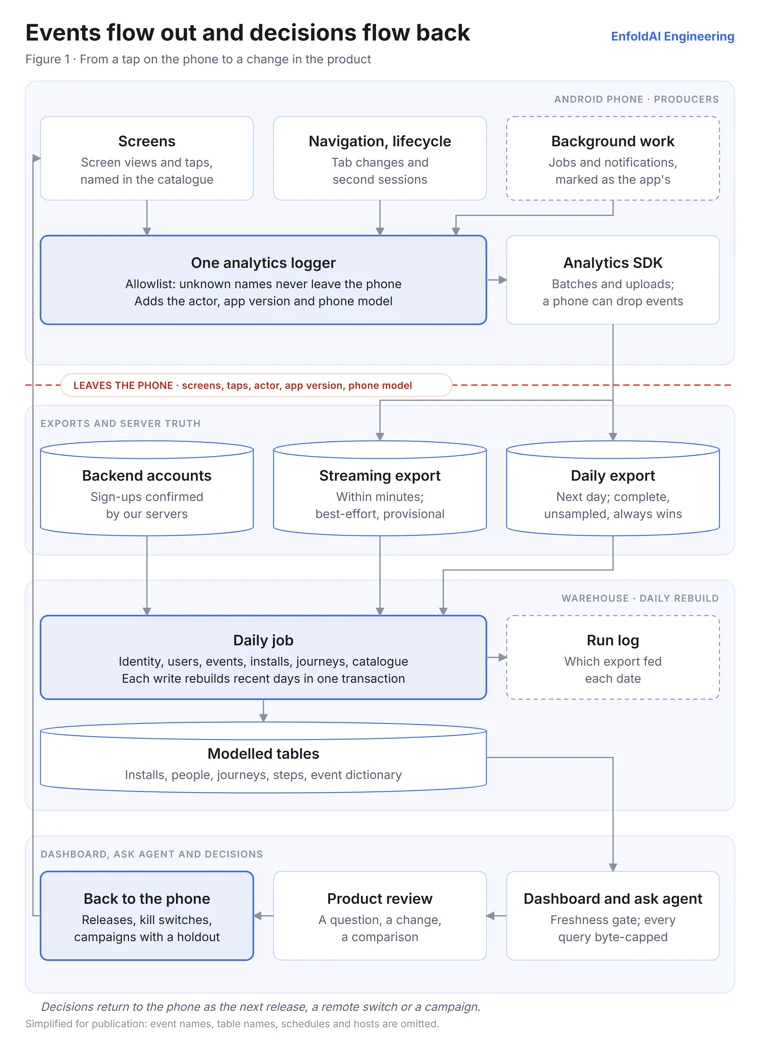
Here's the path of one event, the tap on "Set as default" from the specimen above.
- Emit. The screen calls our analytics logger with the screen, the element and the actor. The logger checks the name against its allowlist, adds the app version and the phone's model, and hands the event to the SDK, which batches and uploads it.
- Export. The event appears in the streaming export within minutes, and in the complete daily export the next day.
- Model. A daily job rebuilds the recent days from the raw export. It resolves identity, writes one row per event and per install, assembles onboarding journeys and refreshes a catalogue of every event it has seen.
- Read. The dashboard reads those tables behind a freshness gate, our ask agent answers new questions, and the people deciding what to change next read both.
None of this arrived at once. In April 2026 a single logger with an allowlist replaced direct SDK calls and began recording screen views and taps across the app. The dashboard started in March by querying the analytics API directly, and between June and August it moved onto tables modelled from the raw export, with one definition of an install. Retention cohorts, the event dictionary and the ask agent followed in September.
The event contract: a catalogue with a contract test
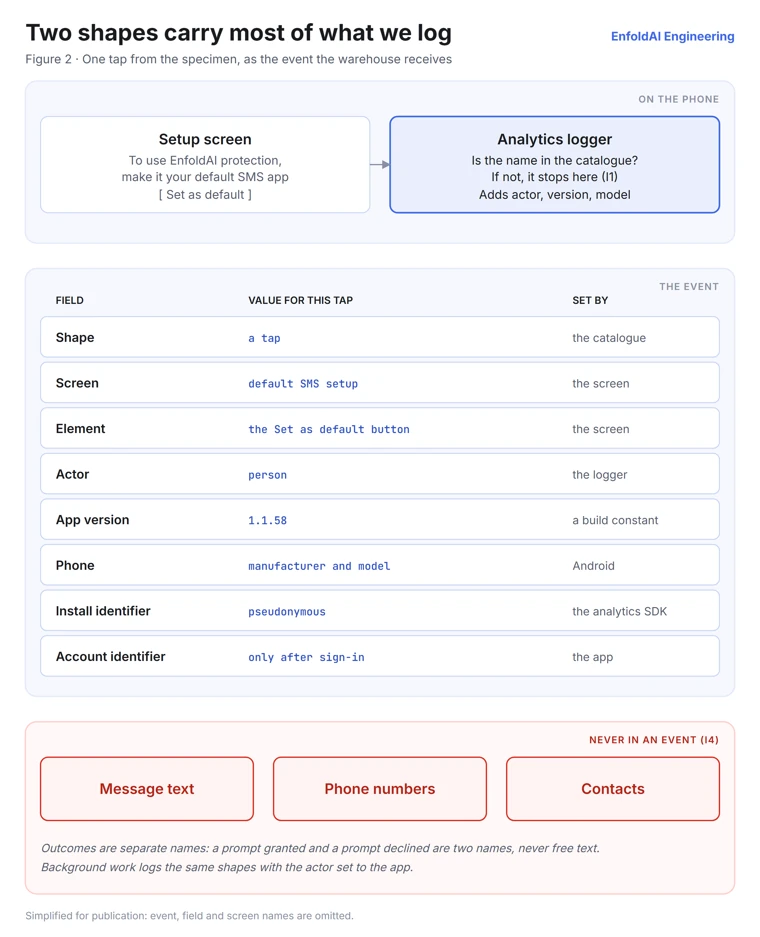
Most product questions come down to which screen someone saw and what they tapped on it. So the backbone of our catalogue is two shapes, a screen view and a tap, each carrying the screen, the element and the actor. Dedicated events cover flows whose outcomes we count separately, such as a permission prompt that can be granted or declined.
Outcomes are separate element names rather than a free-text result. A toggle logs a different element when it turns on than when it turns off, and a failed sign-in is its own named outcome instead of a generic error event. That keeps every value in the catalogue, where the dashboard can list it and a reviewer can read it.
// Simplified for this post. Real names and fields differ.
enum class Actor { PERSON, APP }

object Analytics {
    private val catalogue = setOf(SCREEN_VIEW, TAP /* , outcome events */)

    fun log(name: String, screen: String, element: String, actor: Actor = Actor.PERSON) {
        if (name !in catalogue) return            // unknown names never leave the phone (I1)
        sink.log(name, mapOf(
            "screen" to screen, "element" to element, "actor" to actor.name,
            "app_version" to AppInfo.VERSION,      // a compile-time constant
        ))
    }
}
The catalogue is a set of constants, and a contract test fails the build if a catalogued name is renamed or deleted (I2). Event groups also carry written rules about what they may never hold, such as "Counts only — neither may ever carry a sender, a message, or a scam label." The fraud-report flow passes its extras through an allowlist, with a test that pins typed text out of it (I4). Changes to the logger and the catalogue sit in the highest-risk review lane our repository defines.
The actor field, added in July, separates what people do from what the app does on its own, such as a background job finishing or a notification arriving (I3). Without it, a screen the app opened would count as a screen someone chose to visit.
Events from the Android lifecycle, not just buttons
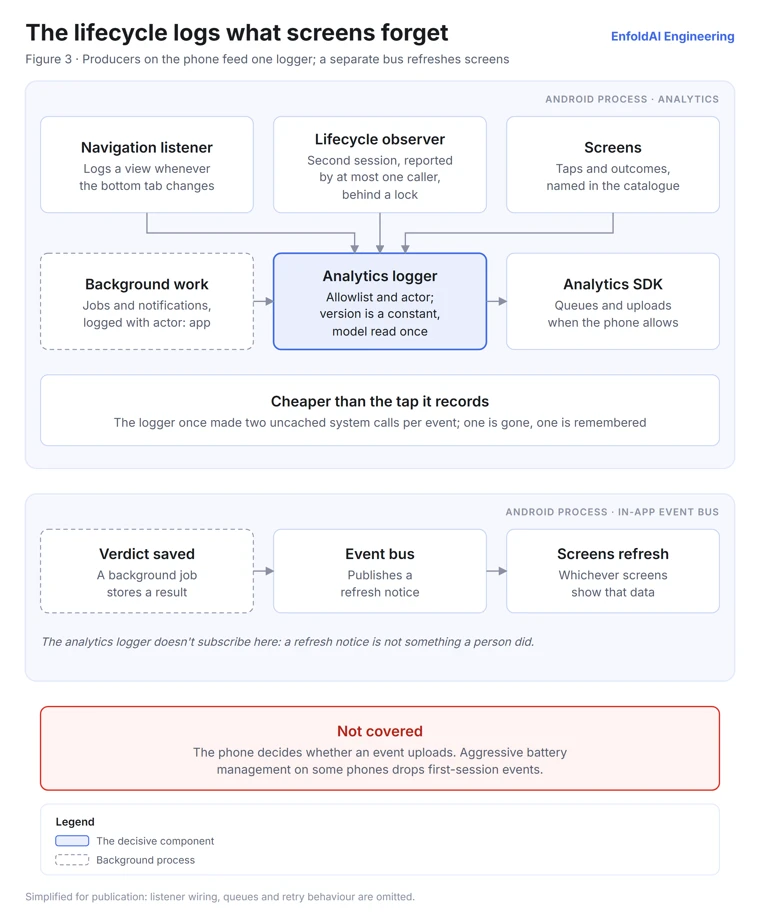
A screen that forgets to log is silent rather than wrong, so we put the events that describe the app as a whole on Android's lifecycle instead of on individual screens. A listener on the bottom navigation logs a view whenever the destination changes, so tab views don't depend on each tab remembering to log. A process-wide lifecycle observer detects a person's second session, and a lock ensures that at most one caller ever reports it, however many screens start at once.
Inside the app, the same pattern does a different job. An in-process event bus tells screens when data has changed, so the code that saves a scam verdict doesn't need to know which screens show it. Analytics doesn't subscribe to that bus, because a refresh notice is a different fact from something a person did.
Instrumentation also has to cost less than the thing it measures. In September we looked into an "application not responding" report whose main thread was stuck waiting on the system. The stack had no frame of ours, and the fix doesn't claim to have proven the cause. But it found that our logger made two uncached calls into the system on every event, and the logger is reached from about 250 tap and scroll listeners across 58 files, so every tap on the home screen paid for two round trips on the main thread. One call is gone, because the app's version is a compile-time constant, and the other result is now remembered for the life of the process.
The limit is that a phone decides whether an event ever uploads. On some phones with aggressive battery management, first-session events never arrive, which is why the next sections count outcomes from the server wherever they can.
From raw export to facts: rebuild, never patch
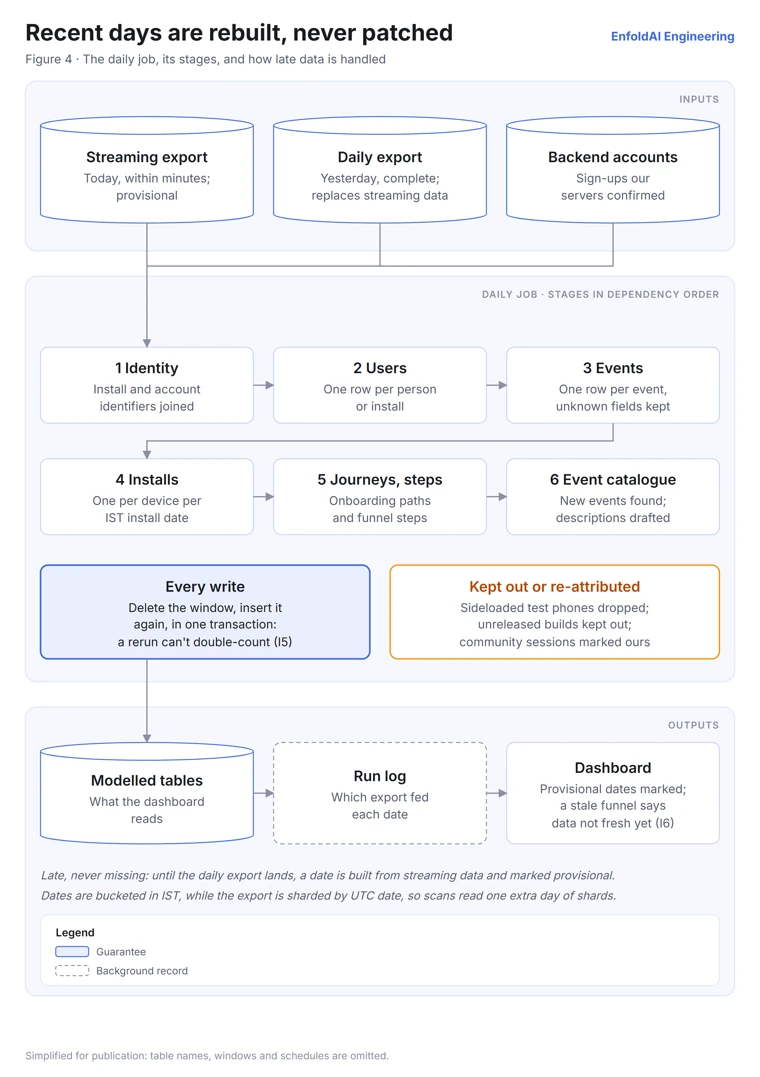
A daily job turns the raw export into the tables the dashboard reads. It runs its stages in dependency order, starting with identity, then users, events and installs, then onboarding journeys and step tables, and finally the event catalogue. Each stage rebuilds a trailing window of recent days rather than adding to yesterday's numbers.
-- Simplified for this post. Real tables and windows differ.
BEGIN TRANSACTION;
DELETE FROM daily_facts WHERE event_date >= @window_start;
INSERT INTO daily_facts
SELECT * FROM rebuilt_facts WHERE event_date >= @window_start;
COMMIT TRANSACTION;
Because every write deletes and reinserts its window inside one transaction, running the job twice gives the same answer as running it once (I5), and a failed write leaves its table as it was. A run log records which export fed each date. Our pipeline notes describe the export as "late, never missing", so a recent date is built from the streaming table until the daily export lands, the daily export always wins, and the dashboard marks a provisional date until then (I6).
Sideloaded test phones are dropped when events are extracted, builds that never shipped are kept out of organic installs, and installs made during our community sessions are attributed to us rather than to a campaign.
The schema changes with every release, so the pipeline keeps any field it doesn't recognise as raw JSON instead of dropping it, and only ever adds columns. Every night it also rediscovers the events in the export and adds new ones to an event dictionary. A language model drafts a description for each new event, a person can confirm or rewrite it, and the pipeline never overwrites a description a person has confirmed.
Installs, people and one definition
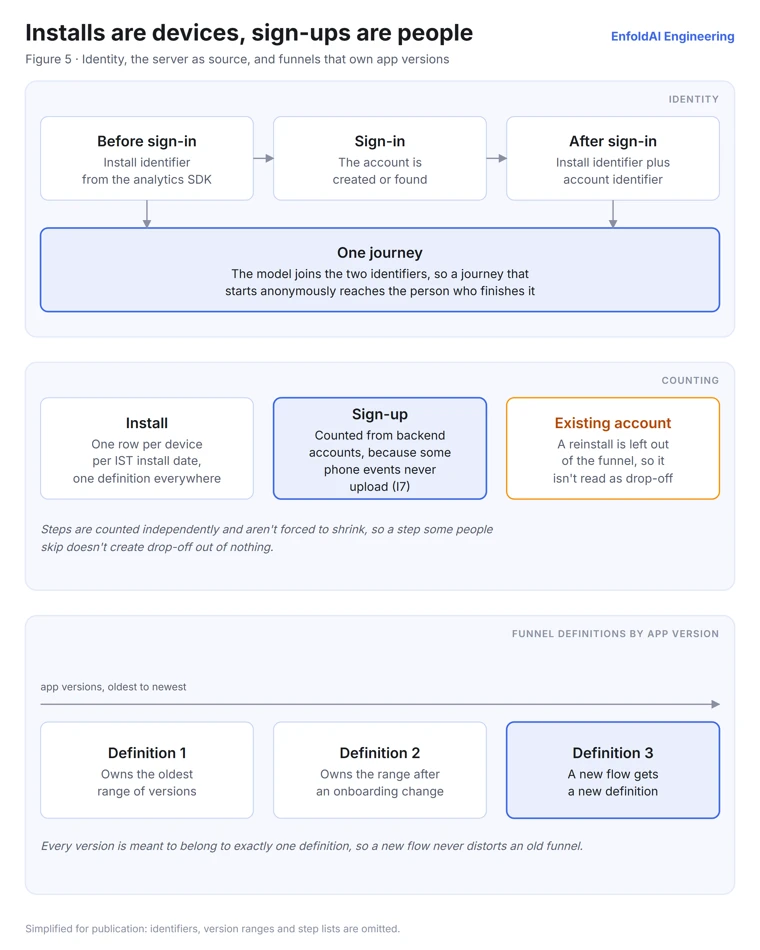
The hardest bugs in product analytics are definitions that disagree. In August a commit replaced the install counts on several screens, which "had silently drifted apart", with one definition used everywhere, one row per device per IST install date.
Installs are counted per device and sign-ups per person, because they answer different questions. Before sign-in an event carries an identifier for the app install, and after it an account identifier as well, so the model can join a journey that starts anonymously to the person who finishes it. Someone reinstalling with an existing account is left out of the onboarding funnel, since their reinstall would otherwise read as drop-off that never happened.
Where the server can confirm an outcome, the server is the source (I7). In July we investigated registered users with no analytics events at all and traced them to first-session events that never uploaded, concentrated on phones with aggressive battery management. The registered step of the funnel is now counted from accounts on our backend.
Onboarding changes from release to release, so each funnel definition owns a range of app versions, and every version is meant to belong to exactly one definition. A new flow gets a new funnel instead of distorting the old one. Steps are counted independently and aren't forced to shrink from one to the next, so a step that some people skip doesn't create drop-off out of nothing.
From a number to a decision
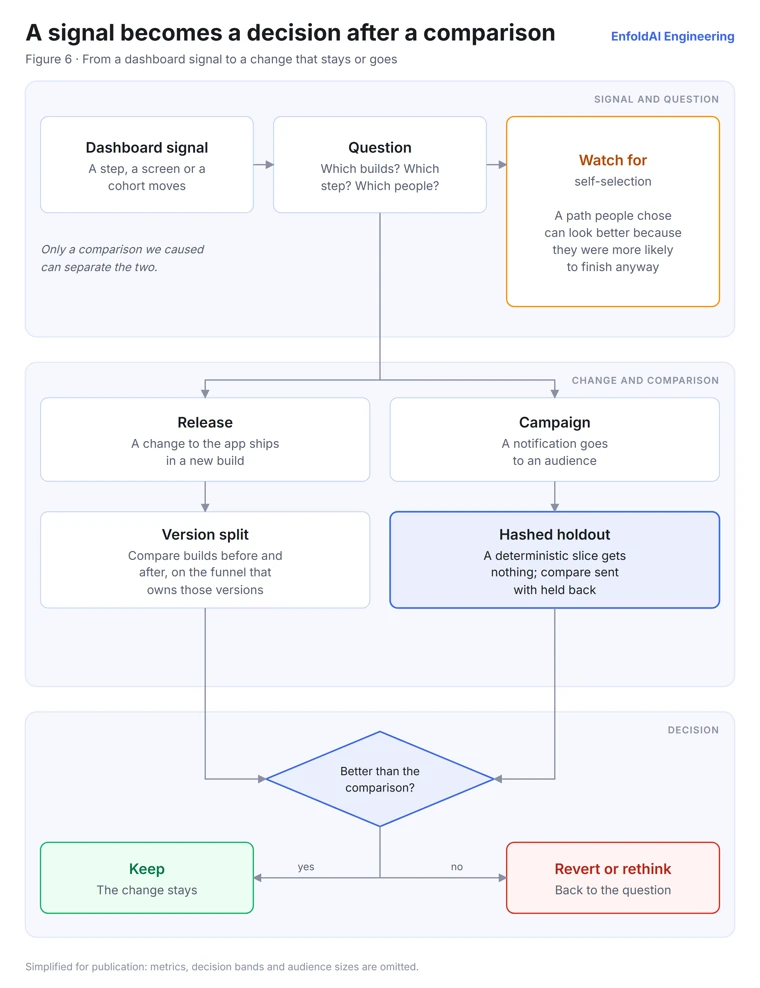
The dashboard has pages for onboarding, screens, retention, campaigns and the event dictionary. Every query runs under a cap on the bytes it may scan and behind a short cache, and a funnel whose data isn't fresh shows "data not fresh yet" instead of a number.
Splitting the funnel by app version has caught real problems. In two builds, sign-in waited on checkboxes, so to the person tapping it the button looked dead. A commit in the dashboard repository records why the gate was removed, "users used to tap a dead button and uninstall", and sign-up rates split by build are how we check that later builds stayed fixed.
Some decisions changed what we measure rather than the app. In September we added weekly seven-day retention because "the early churn that moves most was invisible" in monthly cohorts. Our notification campaigns also hold back a deterministic slice of their audience, chosen by hashing an identifier, so we compare people who got a message with people who didn't instead of reading a funnel that would have moved anyway.
And some data argued against a change. One onboarding path showed a better result than another, but our analysis judged it "most plausibly self-selection", because the people who chose that path were already more likely to finish. We didn't reorder onboarding on the strength of it.
Text-to-SQL with guardrails: plain-English questions on a guarded query runner
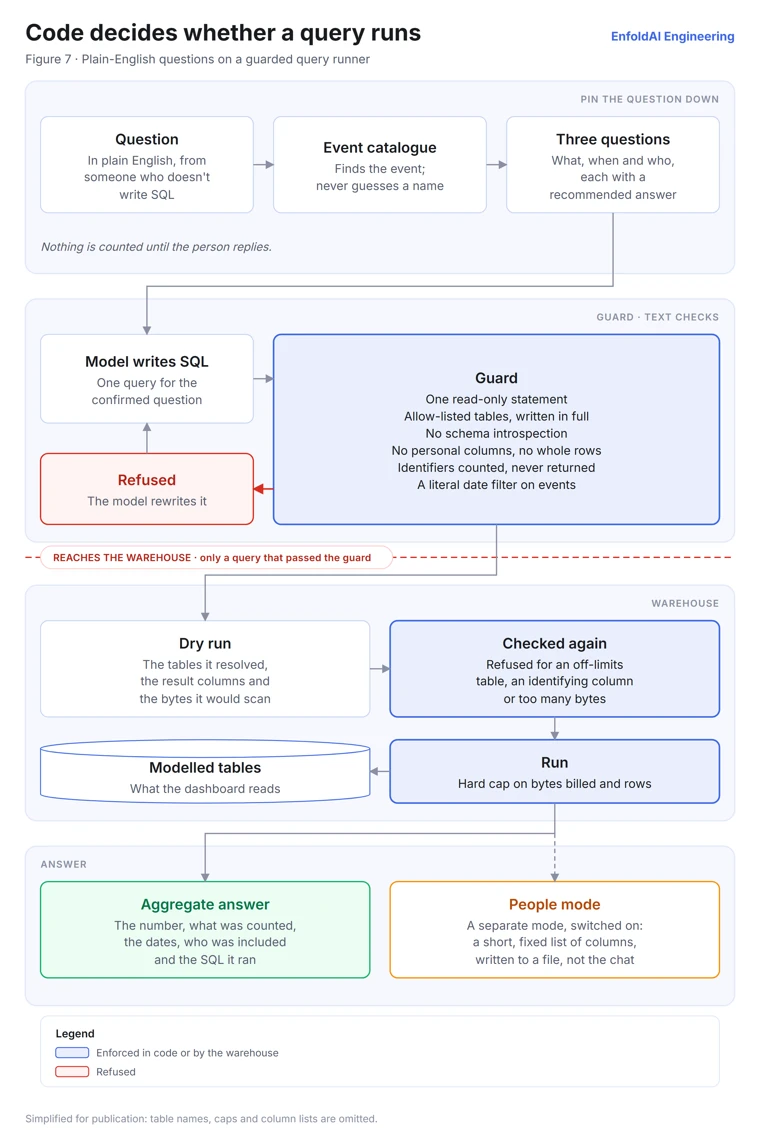
A dashboard answers the questions someone built a page for, and a product review keeps raising new ones, often from people who don't write SQL. Since September, our ask agent has taken those questions in plain English, and a language model writes the warehouse query. This is text-to-SQL, and the person asking usually cannot check the query, so nothing that matters rests on the model getting it right.
The agent first pins the question down. It finds the event in the catalogue instead of guessing a name, then asks three short questions, each with a recommended answer, about what is counted, over which dates and for whom. Nothing is counted until the person replies, and every answer states what it counted, the exact dates, who was included and the SQL it ran.
The agent reaches the warehouse through a runner that checks every query with a guard first. The guard allows one read-only statement over an allow-list of modelled tables written out in full, with no schema introspection. It refuses columns that identify a person and whole rows, and per-person identifiers can be counted but never returned, so the answer is an aggregate. A query on the events table needs a literal date filter, so no question scans all of history by accident. A refused query goes back to the model to rewrite.
A check that reads SQL as text can be fooled by an unusual spelling, so a dry run follows. It reports which tables the query really reads and which columns it returns, and both lists are checked again before the query runs under hard caps on bytes billed and rows returned. Questions about who did something, rather than how many, need a separate mode that must be switched on, and it writes a short, fixed list of columns, never contact details, to a file instead of the conversation.
Design considerations
| Pillar | How it shows up |
|---|---|
| Privacy | Written rules on what each event group may never hold, an allowlist on the fraud-report flow, the phone's model as the only device detail, and a guard on every query the ask agent writes |
| Correctness | One install definition, outcomes counted from the server, funnels tied to app versions, and test traffic kept out |
| Reliability | Idempotent daily rebuilds, provisional days until the complete export lands, and a run log for every date |
| Performance | Per-event details computed once per process instead of on every tap |
| Cost | Byte caps on every dashboard and ask agent query, and a short cache on the dashboard |
Lessons learned
- Treat events as an API. A catalogue and a contract test cost little compared with a year of dashboards built on names that quietly changed.
- Record who caused an event, or background work and notifications will look like engagement.
- Rebuild facts from the raw log instead of patching them, so recomputing is always safe and a bad day can simply be run again.
- Count outcomes where they can be confirmed. A phone's event is evidence of what someone tried, and the server knows what happened.
- Agree on definitions before arguing about numbers. Most of our analytics bugs were two correct queries answering different questions.
- Enforce the rules for model-written queries in code and in the warehouse, where the model's own mistakes cannot get past them.
Conclusion
Collecting events was the easy part. The work that made them useful was deciding what each one means, keeping that meaning stable across releases and being honest about which numbers can't be trusted yet. In an upcoming post we'll cover how we measure changes to the default SMS app step. If you want the other half of the system, the one that decides whether a message is a scam, start with how EnfoldAI spots a scam message.
If you're holding the phone
EnfoldAI's usage analytics record which screens you open and which buttons you tap, along with the app version, your phone's model and, once you've signed in, your account identifier, so we can see where setup gets stuck and fix it. They never include your messages, the numbers that text you or your contacts. If you skipped the step where Android asks you to choose a default SMS app, you can make EnfoldAI the default later from your phone's settings. Our privacy policy covers how we handle the data the app does collect.
What we leave out
We're happy to explain how our defences work, but not how to get around them. That's why this post leaves out thresholds and caps, the exact conditions that trigger each check, the names of our events, tables and columns, and hosting details. None of our protection depends on keeping the design secret, but there's no reason to hand out a tuning manual either.
Sources
- Ministry of Home Affairs cyber-fraud figures for 2025, reported by ThePrint, 21 February 2026.
- Android Developers, RoleManager API reference, accessed 6 October 2026.
- Google Analytics Help, BigQuery Export, accessed 6 October 2026.
Acknowledgments
This system is the work of EnfoldAI's Android, data and growth teams. We especially thank our founding engineers, Dhruv Kalra and Boya Veera Pavan.