The fake e-challan: a real fine format with a fake link
Never pay a traffic fine from a link in a message, and never install an RTO or challan app that arrives as a file. Check the challan yourself on the official Parivahan e-challan site by typing the address in, or in your state transport department's own app from the Play Store. A real challan exists there whether or not you received an SMS; a fake one exists only in the message.
How it plays out
The challan that had his registration number on it
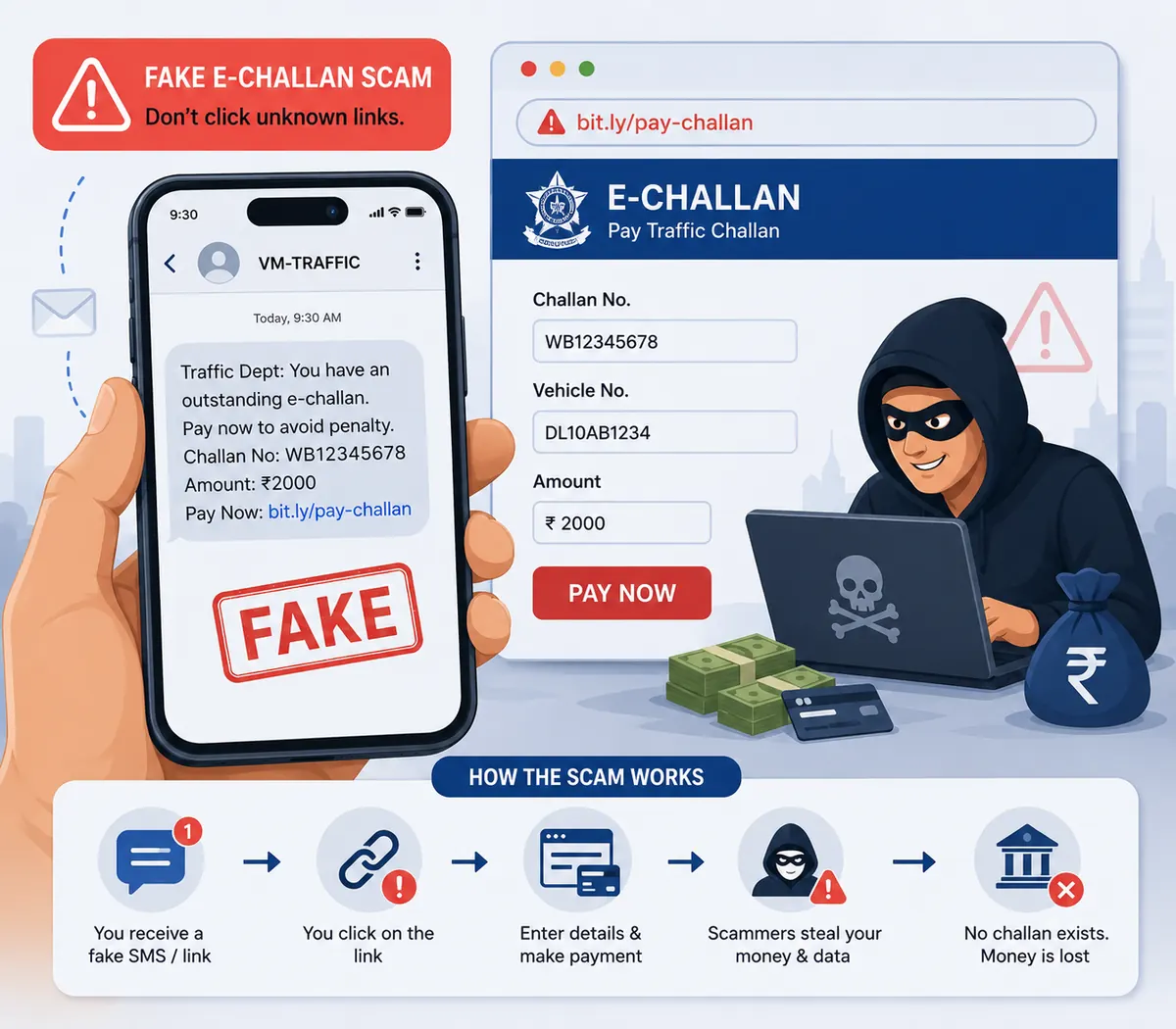
The message comes in on WhatsApp on a Sunday: challan number, his own registration number, a section of the Motor Vehicles Act, ₹1,000, due tomorrow. It reads like the real ones, because it was copied from a real one. Below it, a short link to pay.
He was in that part of the city last week. That is enough. He taps the link, and the page that opens is the traffic-police portal he has used before. The same header, the same seal, a challan detail matching the message, and a Pay Now button.
The card details go in. The payment fails, so he tries again with the second card. Then a call comes from a "helpdesk" number printed on the page, offering to complete the payment for him if he shares the OTP.
In the version doing the rounds now the link does not open a page at all. It downloads a file (something named like the official RTO app) and installing it grants an app permission to read SMS. From then on OTPs never have to be asked for, because the app collects them.
Two card numbers, a CVV and an OTP, spent over the following week on transactions he did not make, and no challan had ever been issued.
A composite of the fake e-challan pattern as described in Indian state police and cyber-cell advisories, including the malicious "RTO app" APK variant flagged in national advisories. No real person or case is depicted.
Where it could have stopped
The address bar. The real service is echallan.parivahan.gov.in; this one ended in .info, and a government challan is only ever on a .gov.in domain. Looking the vehicle up by typing that address in would have shown nothing outstanding, in under a minute, for free.
 High risk
What EnfoldAI does here
Scam SMS filter
EnfoldAI flags the challan SMS as a scam and says why: the link does not go to a .gov.in address, whatever the message says about your vehicle. Paste the WhatsApp version into the checker and you get the same answer, before anything is downloaded.
Flags scam and spam SMS automatically.
Auto-check with EnfoldAIHow this scam works
The order is the explanation. Find where your own experience stops in this list. That is how far along the script has run.
- The message copies the government format closely. A challan number, a vehicle number, a section of the Motor Vehicles Act, an amount and a due date. It arrives by SMS or WhatsApp.
- The vehicle number is often correct. Registration details have leaked from several sources, and a message that names your own car reads as official and stops most people checking anything else.
- The link goes to a lookalike domain (something ending .in, .com, .info, .top or .xyz, or a hyphenated variant) rather than the official service, which is on a .gov.in address.
- The payment page is a copy of the real portal, sometimes complete with a fake helpdesk number that a person answers.
- The payment collects card details or opens a UPI collect request. Either way the amount charged is not the amount shown, or the details are reused later.
- A newer version does not open a page. The link downloads an APK named after an official RTO or Parivahan app; installing it asks for SMS permission, which hands over every OTP the phone receives from then on.
- Some versions add a threat of court appearance or licence suspension to compress the time you spend thinking about it.
If it has already happened
In order, and the order matters. The first step is the one that can still get the money held, so it comes before everything else.
- If you paid by card, call your bank on the number on the card and ask them to block it and raise a fraud dispute.
- If you approved a UPI request, raise the dispute in the UPI app and with your bank, and report on 1930 as soon as you can.
- If a file was downloaded or installed, put the phone in aeroplane mode, uninstall the app, and treat every OTP-protected account on that phone as exposed. The fake-apps guide has the full sequence.
- Check the official Parivahan e-challan service yourself, by typing the address, to see whether a genuine challan exists. It usually does not.
- Report the message on 1930 or at cybercrime.gov.in with the link and the sender.
E-challan scams: common questions
The questions people actually ask about this one, answered in a line or two each.
How do I check whether a challan is genuine?
The message had my real vehicle number. Does that make it genuine?
What does the real challan address look like?
The link downloaded an app. Is that normal?
Check before you trust
Paste any SMS, link or app and get a verdict before money moves. Auto-scan flags scam messages the moment they arrive.
Suspicious message? Check it free →