The KYC update scam: "your account will be blocked today"
A bank does not close a working account by SMS on a few hours' notice, and it does not collect KYC through a link or an app someone sends you. Real KYC is done in the branch, in the bank's own app, or on the bank's own website that you typed in yourself. If a message gives you a deadline today and a link to meet it, the deadline is the scam.
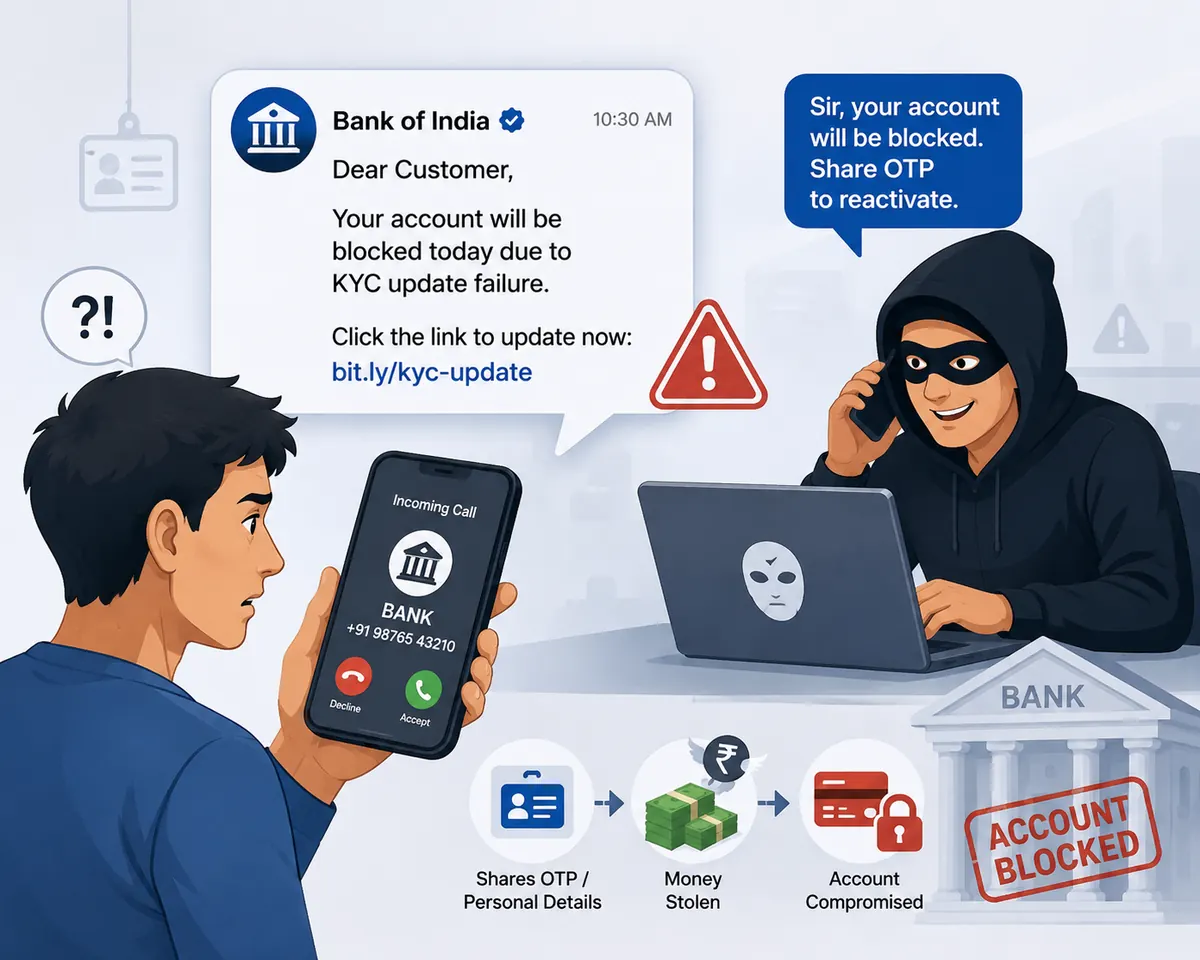
How it plays out
The call that already knew her account number
The message lands at 9.40 in the morning and gives her until the end of the day: KYC expired, account will be blocked, update here. There is a link. The name in the link has her bank in it, with one extra word she does not notice, and it ends in .info rather than the bank's real address.
The page is her bank's login screen, down to the shade of blue. She enters her customer ID, her net-banking password, her date of birth and her card number, because the form asks for them and the form looks like her bank.
At 9.47 the phone rings. The caller greets her by name, states the last four digits of her account, and says the update is nearly through: one OTP, and the KYC is closed for the year. He is patient and slightly bored, the way a bank employee is. She reads out the OTP. She reads out the second one too, when he explains the first had expired.
By the time she calls the bank's real number the money has gone in two transfers, and the transfers were authorised with codes she gave away herself, which is the thing that will make her not want to report it.
₹1,40,000 in two transfers, seven minutes after she typed her password into a page that was not her bank's.
A composite of the KYC-phishing pattern as described in RBI customer-awareness notices and Indian police cyber-cell advisories, including the fake bank-app and lookalike-portal variants. No real person, bank or case is depicted; the amount is illustrative.
Where it could have stopped
The caller knowing her account number was not proof he worked at the bank. It was proof the fake page had worked. Nobody at a bank ever needs an OTP read out to them, so the call could have ended there with nothing lost but a password she was about to change anyway.
 High risk
What EnfoldAI does here
Scam SMS filter
EnfoldAI marks the KYC message as a scam the moment it arrives. An unregistered sender, a deadline measured in hours, and a link to a domain that is not your bank's. You read the warning instead of the login page, and the call that was going to follow has nothing to work with.
Flags scam and spam SMS automatically.
Auto-check with EnfoldAIHow this scam works
The order is the explanation. Find where your own experience stops in this list. That is how far along the script has run.
- A message arrives saying your KYC has expired and the account will be blocked, usually today, usually within hours.
- It carries a link. The domain looks close to a bank's but is not it: an extra word, a hyphen, or an ending like .top, .xyz or .info instead of the bank's real domain.
- The page is a copy of the bank's login screen. What you type into it (customer ID, password, card number, PIN, date of birth) goes to the person who built the page.
- Some versions send an app instead of a page: an APK that copies the bank's own application, installed outside the Play Store, which captures the same details as you log in.
- Then your phone rings. Someone who already knows your name, your bank and the last digits of your account asks for the OTP "to complete the KYC update". They know those details because you typed them a minute ago. The call is proof the page worked, not proof the caller is your bank.
- A second OTP is usually asked for, with an explanation ready: the first expired, the system timed out, the branch server is slow. Each one authorises a separate transfer.
- A variant sends you to a call first and the link second, and a variant for older customers offers to "send an executive home" to collect documents and a signed form.
If it has already happened
In order, and the order matters. The first step is the one that can still get the money held, so it comes before everything else.
- If you entered details on the page, call your bank immediately on the number on your debit card and ask them to block the card and the net-banking login.
- If you shared an OTP, treat a transaction as already in progress. Ask the bank to raise a fraud dispute now rather than waiting to see whether money moves.
- Change your net-banking password and your UPI PIN from a device you trust.
- If you installed an app from the link, uninstall it before you log in to anything else, and change the passwords afterwards rather than before.
- Report on 1930 or at cybercrime.gov.in as soon as you can, with the message, the link and the number that called you.
- Do your actual KYC afterwards through the branch or the bank's own app, so the real requirement does not go unmet.
KYC scams: common questions
The questions people actually ask about this one, answered in a line or two each.
How do I tell a real bank SMS from a fake one?
Will my account really be blocked today if I ignore it?
The caller knew my account number. Was it really my bank?
Check before you trust
Paste any SMS, link or app and get a verdict before money moves. Auto-scan flags scam messages the moment they arrive.
Suspicious message? Check it free →