Fake customer care numbers: the helpline you searched for was the scam
A customer care number found in a search result, an ad, a map listing or a social-media comment can belong to anyone, and scammers plant them for banks, payment apps, airlines, couriers and shops. Take the number only from the company's own app or website, or the back of your card. Real support never asks for your OTP, UPI PIN or card details, and never asks you to install AnyDesk or any other screen-sharing app.
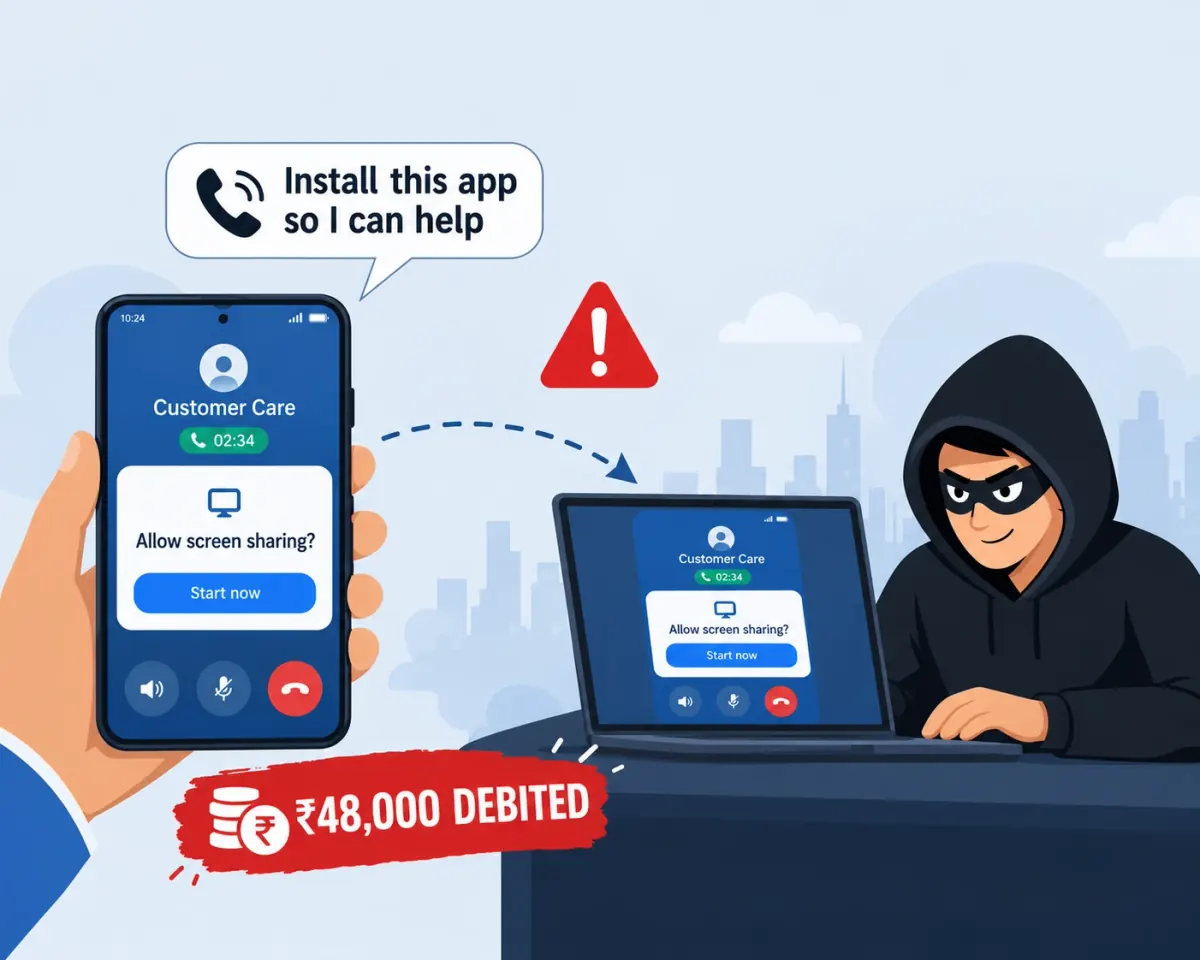
How it plays out
The failed ₹2,400 payment, the helpline in the first result, and the app that let him watch
A ₹2,400 electricity bill payment fails, but the money leaves her account. She searches for the payment app's customer care number, and the first result has one, on a page that looks official. The man who answers is patient, knows the app well, and asks for the transaction ID the way a real executive would.
The refund, he says, is stuck and has to be pushed through by hand. He sends a link to a "support app" so that he can see the error on her screen. It is a genuine screen-sharing app, and once it is running he sees everything her phone shows.
He asks her to open her UPI app, type a "refund code" in the amount field and enter her UPI PIN "to receive it". The first transfer goes out for ₹24,000. He apologises, says the code was typed wrong, and asks her to repeat it. The second is for the same amount.
The real customer care was in the payment app all along, under Help. The number she called came from a page built to look like the company's and to be found by people searching in a hurry.
₹48,000 in two transfers, authorised with her own PIN while the caller watched her screen, over a ₹2,400 payment that would have been reversed automatically.
A composite of the fake customer-care pattern as described in RBI, NPCI and Indian police advisories and in reported cases, including the searched number, the screen-sharing app and the PIN "to receive" a refund. No real person, company or case is depicted; the amounts are illustrative.
Where it could have stopped
The request to install an app. No bank or payment app needs to see your screen to process a refund; the moment a helpline asks for AnyDesk, QuickSupport or any screen-sharing app, the call is the fraud, and hanging up costs nothing.
 High risk
What EnfoldAI does here
Scam checker
The "support app" link and the instructions sent with it can be pasted into EnfoldAI before anything is installed. The checker flags a helpline that sends a screen-sharing app or asks for a PIN to receive money, which is the step this scam cannot do without.
Paste any message, link or app.
Auto-check with EnfoldAIHow this scam works
The order is the explanation. Find where your own experience stops in this list. That is how far along the script has run.
- Scammers publish phone numbers under the names of banks, payment apps, airlines, couriers, gas agencies, shopping sites and electricity boards: on look-alike websites, in sponsored results, in edited map listings, in social-media replies and on complaint forums. They are found by people searching in a hurry, which is who they are for.
- The caller sounds like support. They ask for an order or transaction ID, use the company's own vocabulary, and are sympathetic about the problem you called with: a failed payment, a refund, a blocked card, a cancelled ticket, a pending KYC.
- Then comes the step that takes the money. The commonest is a screen-sharing app (AnyDesk, TeamViewer QuickSupport, RustDesk or a renamed copy) "so I can see the error", after which your OTPs, PINs and passwords are read off your own screen.
- Other versions: a "refund form" link that asks for the card number, expiry, CVV and the OTP; a UPI collect request you are told to approve to "receive" the refund; an amount typed in as a "refund code"; or an APK sent over WhatsApp.
- Sometimes the scammer calls first: from a number saved as "Customer Care", after you complained about the company on social media, or in reply to a post where you tagged it.
- A UPI PIN is only ever needed to send money, never to receive it. A failed payment that took money from your account is reversed automatically, normally by the next working day, without anyone needing to call you.
If it has already happened
In order, and the order matters. The first step is the one that can still get the money held, so it comes before everything else.
- Hang up, and if a screen-sharing app is running, end the session and uninstall the app now.
- Call your bank on the number on your card or its own website, have UPI, cards and net banking blocked, and ask for a fraud dispute on every transfer made during the call.
- Report on 1930 or at cybercrime.gov.in within the hour, with the number you called, where you found it and the transaction IDs.
- From a different device if you can, change your net-banking password, UPI PIN and email password, and sign out of every other session.
- If an APK was installed, treat the phone as compromised: uninstall it, and have the phone checked before you use banking apps on it again.
- Report the fake number where you found it: the search or map listing, the social-media post or the website.
Fake customer care: common questions
The questions people actually ask about this one, answered in a line or two each.
How do I find a company's real customer care number?
Customer care asked me to install AnyDesk. Is that normal?
Do I need to enter my UPI PIN to receive a refund?
My UPI payment failed but money was debited. Who do I call?
Check before you trust
Paste any SMS, link or app and get a verdict before money moves. Auto-scan flags scam messages the moment they arrive.
Suspicious message? Check it free →